ClearFront
Free Trial Nova Video 1 Month Nova Video 3 Months Nova Video 6 Months Nova Video 1 Year Nova Video CDN Web Acceleration All Products
Open New Ticket Help Center Installation Guides Network Status
Login Register
ClearFront

Help Center

Products Login Register

How to Set up Hotlinking Protection

0

ClearFront allows you to set up hotlinking protection and stop other websites from both stealing your content and increasing your bandwidth bills. You can set this up in 3 easy steps by creating a list of allowed referrers.
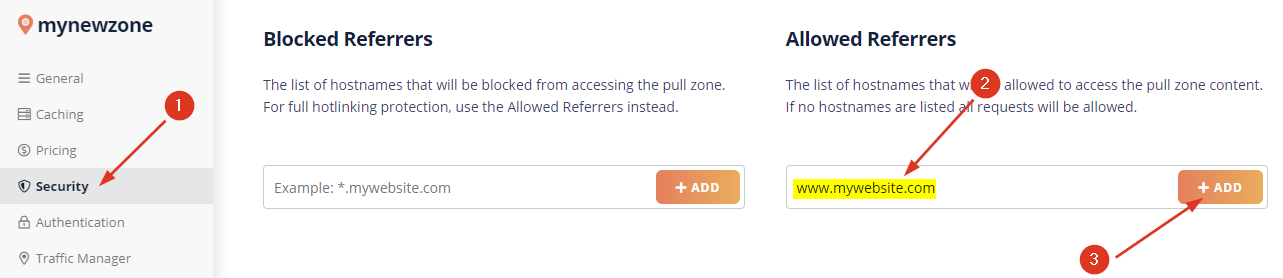


1. Open your pull zone security settings

First, log into your dashboard, open your pull zone management page and click on the Security panel.

2. Add Allowed Referrers

Enter your website domain name without any protocol or paths (For example www.mywebsite.com) and click the add allowed referrer button.

3. Repeat for every domain and subdomain

Finally, repeat this for each of the domains you want the data to be accessible on. You can also use a simple wildcard to include all the subdomains (*.mywebsite.com). However, do keep in mind that this does not include the root domain. You will have to include it separately. Any website not on the list will receive a 403 Forbidden response instead of your content.


Was this answer helpful?

Related Articles

Fixing the "CDN Acceleration Is Not Enabled" error If you're seeing an error message indicating that CDN acceleration isn't detected on your website... I have Unexpected CDN URL Redirects Sometimes we see the CDN URLs return a 301 redirect back to your own website. Usually, when... Not all of my WordPress static URLs are being served by ClearFront In some cases, even after configuring the ClearFront CDN plugin in WordPress, some or even all... My browser is still sending cookies despite enabling the Disable Cookies feature for my Pull Zone When you run GTMetrix or other diagnostic tools on your website, you may find that the... How do I run a traceroute? Traceroute is a commonly used tool for diagnosing network routing issues, measuring delays...
« Back

Loading...
Loading...

Generate Password

Please enter a number between 8 and 64 for the password length
Choose language
العربية Azerbaijani Català 中文 Hrvatski Čeština Dansk Nederlands English Estonian Persian Français Deutsch עברית Magyar Italiano Macedonian Norwegian Português Português Română Русский Español Svenska Türkçe Українська

Copyright © 2026 ClearFront. All Rights Reserved.

Dashboard Services Products Billing Support Help Center